START WITH THE WORK
Where does your time keep going?
A new client sends documents. You save the files, find the earlier conversation, check what is missing, prepare the next draft and update your task list. The next client needs much of the same work.
AI workflow automation connects these repeated steps around an agreed outcome. An AI employee is the role doing the preparation; your AI 2nd Brain holds the business context and reviewed methods it needs.
For a Singapore SME owner handling documents, appointments and client work, a useful starting point is one recurring process with clear inputs, a repeatable method and an output you can check. Work that changes completely each time needs more scoping before it can be a sensible first setup.
For example: turn incoming client documents into an organised file set, a preparation checklist and a draft ready for your review.
A WORKFLOW YOU CAN EXAMINE
From received files to a clear next action.
FICTIONAL WALKTHROUGH
A document based service business
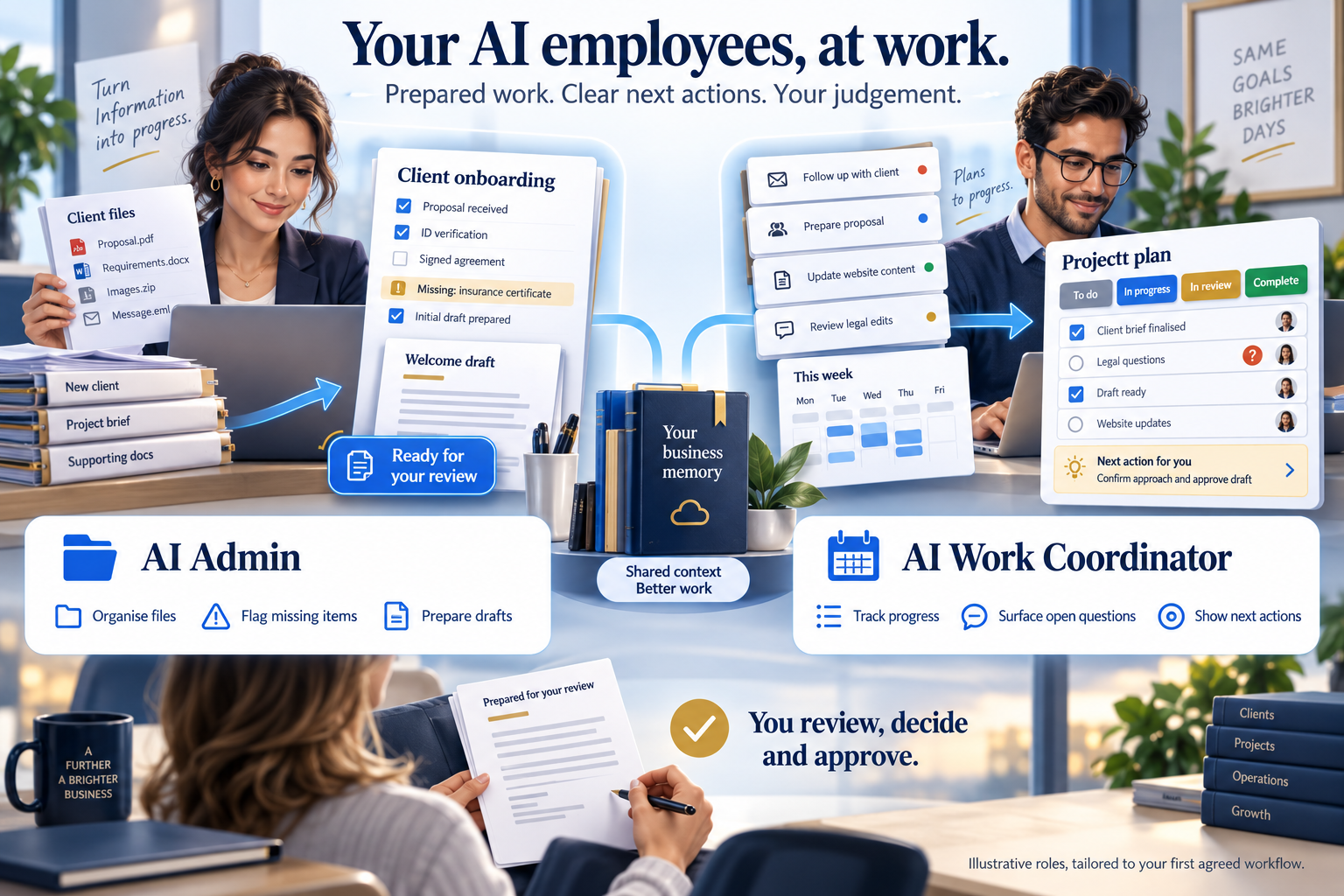
The agreed intake pack requires a completed brief and a signed agreement. The folder contains a completed brief, a draft agreement and an old version of the brief.
Collect the permitted inputs
The workflow uses the folder and conversations you have authorised. It associates the received files with the correct matter and preserves the originals. A file that cannot be matched is left for review.
Check against your method
The AI compares the files with the agreed checklist. It flags the agreement for signature confirmation and the duplicate brief for version review. Missing information stays unresolved until evidence answers it.
Prepare useful work
It prepares a short gap list and a message draft asking for the outstanding item. The draft identifies the supporting record so you can check its reasoning.
You review and decide
You confirm the current brief, check the agreement and decide what to tell the client. The system does not independently send the message or commit you to new terms.
Save progress and the next action
The agreed tracker records what you reviewed and what is still outstanding. Relevant business context can be retrieved when you return. Dashboard freshness depends on the sources and refresh method agreed for your setup.
ILLUSTRATIVE OUTPUT FOR OWNER REVIEW
Ready: brief received; current version needs confirmation.
Open: signed agreement not confirmed.
Next: owner reviews the draft request before sending.
Status: preparation in progress.
This is the kind of preparation an AI Admin and AI Work Coordinator can support within a defined workflow. The tools, access and review points are designed around your business.
WHY I BUILT THIS
I wanted more clients. I also had to handle the paperwork.
In my own business, Apply Singapore PR, closing a sale was only the beginning. The documents, checking, preparation and follow ups still needed my attention.
I started building a business memory I could return to: context, decisions and working methods that did not have to be explained again every time. That experience is why I started Apply AI.
My business provides the practitioner example behind this approach. It is not an independent paying Apply AI customer case study. Your workflow still needs its own scope, testing and acceptance.
Meet Alvin and see the founder story ↗WHAT YOU ARE BUYING
One agreed workflow, personally set up by Alvin.
Scope, payment structure and delivery milestones agreed in writing before work or payment.
- AI employee role or roles around your first agreed workflow.
- A custom AI 2nd Brain for the context and methods those roles need.
- A custom business dashboard showing agreed work and next actions.
- An Evolution API instance for authorised WhatsApp conversation scans and document retrieval within the agreed scope.
- Testing, review points and practical handover.
External software, API and hosting costs are separate. Further workflows, integrations, ongoing operation and support require an agreed scope. You retain control of client messages and consequential decisions.
AGREE THE RESULT BEFORE STARTING
Measure the whole task, including your checking.
For an assessed and accepted workflow, the commitment is 50% less admin time on comparable work at the agreed output quality, by the deadline agreed in writing before any work or payment.
The comparison includes checking and correction time. We agree the baseline, sample work, quality requirements and measurement method first; faster draft generation alone does not establish the result.
If the agreed result is not delivered by that deadline, all Apply AI setup fees paid for that engagement are refunded, with no remaining setup balance due. External software, API and hosting charges are separate. This commitment is not a claim of an achieved customer result or a guarantee of higher revenue.
Read the existing results guarantee ↗LESS ADMIN. MORE TIME FOR SALES & CLIENTS.
Tell me what frustrates you now.
Let’s see how we can resolve it with AI employees.
AI results guaranteed or full refund. Scope, measures and deadline agreed before work or payment. Full setup fee refund terms.
Tell Alvin on WhatsAppA conversation is always free. Your message opens as a draft for you to review and send.
Explore the original service example.
This scripted illustration uses fictional cases from the Apply PR preparation method. It does not connect to client records.